CATEGORY
What AI costs in the brokerage office and when it pays off
Daniel D.
11 Min Lesezeit
An offer for an AI solution is lying on your desk. A figure per workstation per month, alongside a list of features. And the question that every owner asks themselves at this point: Does this pay off for a business like ours?
The honest answer: This question cannot be answered by the list price alone. Two tools, both called "AI", can differ in price by a factor of ten, and yet the more expensive one can be the significantly better financial option. This article categorizes the costs of AI in the brokerage office: which types of costs actually arise, what the market is asking for in 2026, and how you can use a simple calculation to check at what point the implementation pays off for your business.
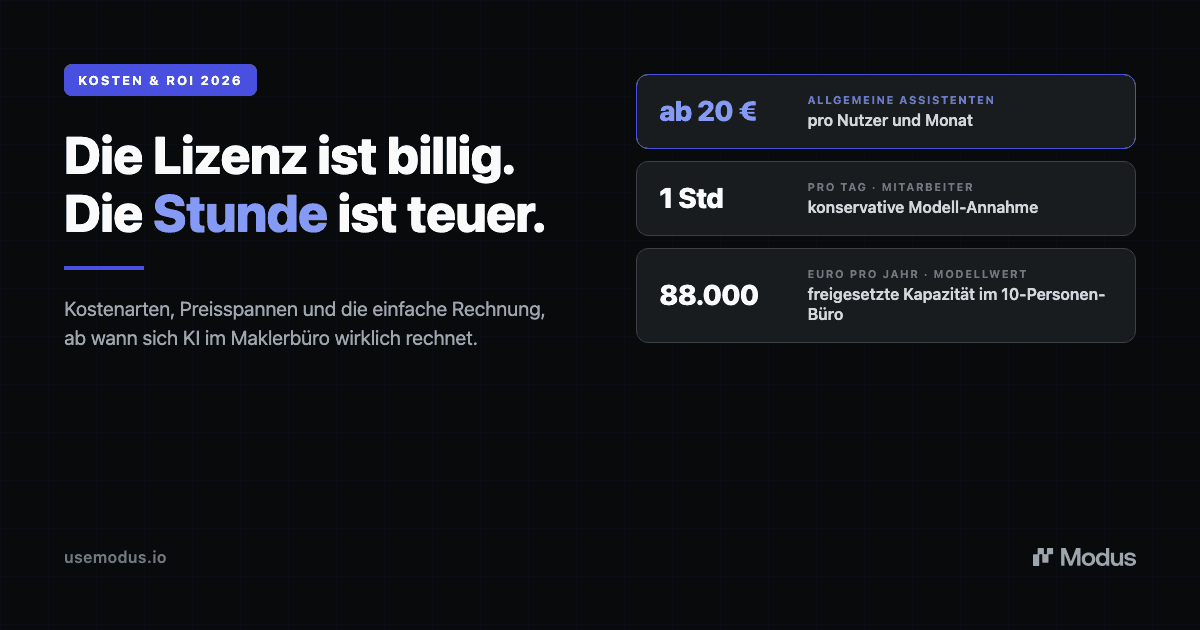
In short: AI software for insurance brokers costs between approximately 20 euros per user per month for general assistants and individually calculated prices per workstation for specialized platforms. The decisive factor, however, is not the list price, but the time recovered per employee. Even one hour per day per employee corresponds to a capacity value of around 88,000 euros a year in a ten-person office. Measured against this, the software is rarely the largest item.
Which types of costs actually arise
Anyone who only looks at the license price underestimates one half of the bill and overestimates the other. In practice, the costs consist of four blocks.
1. The license. The most visible item: a price per user or workstation per month. It is low for general tools and higher for specialized platforms, for one simple reason: a general assistant provides you with text, while a specialized platform takes over work steps. More on this in a moment.
2. Setup and integration. A solution that is intended to work with your broker management program, Outlook, and your channels must be connected. This effort is a one-time cost and strongly determines whether the solution is sustainable in everyday life. A rule of thumb from our own experience: The closer the software works to your existing systems instead of replacing them, the smaller this block is. A switch that is not a migration project but a matter of days costs correspondingly little.
3. Onboarding and change. The most frequently underestimated item. Not because the operation is difficult, but because workflows change. A structured start over four weeks, during which the team turns the new way of working into a habit, is realistic. This time is an investment, not lost time, but it belongs in the calculation.
4. The hidden items. Three things do not appear in any offer and yet still cost money:
Switching costs and lock-in. An AI that is deeply anchored in a single management program or pool migrates with you when you switch. What looks cheap today can make a subsequent system change expensive.
Data privacy setup. Customer data only belongs in a solution with a data processing agreement and processing in the EU. A free consumer account does not fulfill this, and retrofitting costs either money or, in a worst-case scenario, significantly more.
Compliance. Since August 2, 2026, the transparency obligation of the EU AI Act has applied to customer contact. What brokerage firms should have prepared for this is detailed in EU AI Act from August 2026: What insurance brokers must prepare now.
Price ranges in the 2026 market
The market for AI in brokerage firms is confusing, and so are the price ranges. Roughly categorized, it is divided into three levels.
General AI assistants. ChatGPT in the business version starts at around 20 euros per user per month with annual billing (as of August 2026). Microsoft 365 Copilot lies between 15.60 and 28.10 euros per user per month depending on the variant, in each case plus the required Microsoft basic license. In return, you get a powerful tool for drafting, summarizing, and researching. What you do not get: software that knows your business. Every process is set up by hand, and every context is copied in manually.
AI features in the broker management program. Many BMP providers add AI modules for an additional fee. Prices vary greatly and are often tied to the provider's overall package. The advantage: proximity to the portfolio data. The disadvantage: the AI is tied to the provider and usually narrowed down to one channel.
Specialized platforms and operative systems. Solutions that work as a layer above the BMP and turn incoming communication into structured processes are calculated per workstation and according to scope and are offered upon request. This also applies to Modus. There is a simple reason why there are no list prices on the website: the scope depends on team size, channels, and connected systems.
The most important point of this overview: The three levels are not the same product in different price ranges. An assistant for 20 euros speeds up drafting. An operative layer takes over the recognition, assignment, structuring, and preparation of entire processes. A price comparison only makes sense if the scope of services is comparable. We have described the architecture behind these levels in the overview AI software for insurance brokers: What it delivers and what matters in 2026.
When AI pays off: the calculation
Now to the actual question. Whether AI pays off is not decided on the price list, but on your team's timeline.
A look at the industry shows how much bound time there is to be freed up: According to the AfW Broker Barometer, almost every second brokerage firm (45.7 percent) spends a whole working day per week on regulatory matters alone, and more than a quarter spend even more. Added to this is the operational day-to-day business: sorting, assigning, searching, documenting. A bureaucracy burden that many brokers now describe as existential threat.
The calculation itself is simple. You need four values:
Recovered hours per day and employee × Number of employees × Working days per year × Hourly costs = freed-up capacity value per year
An example for an office with ten employees. We deliberately calculate conservatively with one hour per day and employee. That is the lower end of what we already see in our own brokerage firm in the initial phase, where it is one to two hours. For hourly costs, we set 40 euros employer's fully loaded costs for the back office.
ValueAssumptionRecovered time1 hour per day and employeeTeam10 employeesWorking days220 per yearHourly costs40 euros (employer fully loaded costs)Freed-up capacity value88,000 euros per year
Read the other way around: For this calculation to tip over, the solution for the ten-person office would have to cost more than around 730 euros per workstation per month. Market-standard prices are well below that, in each of the three levels.
The same calculation also works for smaller businesses, just with different consequences. An office with three employees arrives at around 26,400 euros of freed-up capacity a year with one hour per day and head. That sounds like less, but weighs heavier: In a small team, there is no one to whom administrative work can be delegated. Every bound hour is directly missing from advisory services, and an additional position is rarely a realistic option for this business size. Therefore, the relative leverage is often greater in a small office than in a large one.
Three things honestly belong in this calculation:
First: This is a calculation model, not a verified measurement. The values are assumptions that you should replace with your own. For one week, track how much time in your business is spent on sorting, assigning, and searching, and calculate with that number.
Second: Freed-up time is capacity, not yet revenue. The 88,000 euros are not in the bank account. They only turn into yield when the gained time flows into advising, portfolio development, and new business instead of an earlier end of the workday. That is precisely why the introduction of AI always includes the decision of what the free time will be used for.
Third: The calculation assumes that the time actually becomes free. A tool that only speeds up a partial step while the rest of the process runs by hand frees up significantly less than the list price promises. With that, we come to the question of how to recognize real leverage.
Why revenue per employee is the right metric
The cost question has a bigger sibling: Which metric do you use to measure whether the investment was worth it?
Our answer: revenue per employee. This figure shows whether your business has operational leverage or just more heads. If the same employees process more transactions because recognition, assignment, and preparation run in a structured manner, revenue increases without personnel costs growing at the same pace. The difference lands in the margin.
In this logic, AI costs are not a software expense, but an investment in exactly this metric. A business that spends 500 euros per month on tools and thereby gains the capacity equivalent of half a position has a better financial result than a business that spends 20 euros and changes nothing in its structure. How to calculate and classify this metric is described in Revenue per employee: The North Star by which brokerage firms should be measured.
The reverse is also true: Anyone who solves the capacity problem with additional staff pays permanently. An additional back-office position costs a multiple of any software license, takes months of onboarding, and is difficult to fill in a swept-clean labor market. We have described why growth via heads structurally runs into limits in The capacity traps of brokerage offices.
How to recognize a real ROI
Not every AI expense pays off. Three criteria separate an investment from just another tool subscription.
Structure before automation. The biggest leverage is not in faster drafting, but at the input: every message recognized, assigned to the correct customer, structured as a process with responsibility. Anyone who automates on an unstructured basis primarily accelerates the errors that are already in the data. Why this sequence is particularly important in insurance is detailed in Why automation without structure is dangerous in insurance.
Integration instead of isolated solution. A solution that replaces your broker management program and Outlook creates migration costs and friction. A solution that sits as a layer over existing systems and works with them keeps implementation costs low and switching freedom high.
Measurability and traceability. A real return is shown in concrete processes: how long does an address change take before and after the introduction, how many processes does the team manage per day, how many are left lying. A documented timeline per process makes this measurable. In our own business, this measurement showed, for example, that a standard process like an address change falls from 10 to 25 minutes down to one to two minutes because searching, assigning, and drafting are prepared.
And one limit belongs to honesty: AI replaces neither advice nor professional decisions. It prepares, the broker checks and approves. The economic effect does not arise because people are eliminated, but because the same people can focus their time on the work that generates brokerage commission.
Frequently Asked Questions
What does AI software for insurance brokers cost? General AI assistants like ChatGPT Business start at around 20 euros per user per month, and Microsoft 365 Copilot is between 15.60 and 28.10 euros plus basic license (as of August 2026). AI modules in broker management programs are calculated as a surcharge to the package. Specialized operative platforms are offered per workstation and by scope, usually upon request.
What does Modus cost? Modus is calculated per workstation and offered upon request, because the scope depends on team size, channels, and connected systems. The fastest way to get a reliable figure for your business is a demo with our team.
How much time does AI really save in the brokerage office? In our own brokerage firm, we see one to two hours per employee and day that become free in the initial phase because incoming work arrives structured. The exact value depends on the share of recurring service processes and the degree of integration. It is important to measure before and after on the specific process type.
Is AI also worthwhile for small brokerage offices? Especially there. The smaller the team, the more every bound hour impacts advisory time, and the less often the problem can be solved via an additional position. Even with two to three employees, one hour per day per head corresponds to the value of a quarter to half a position.
How quickly do I see an ROI? For clearly defined, frequent process types, the time savings show up in the first weeks because the daily routine immediately runs in a more structured way. The full effect occurs when multiple process types are mapped and the freed-up time is deliberately directed into advice and portfolio development.
Conclusion
The question "What does AI cost in the brokerage office?" is quickly answered: from around 20 euros per user per month to individually calculated platform prices. The more important question is: What does it cost to change nothing? A business where every employee loses an hour every day to sorting, searching, and assigning pays a five-figure sum in bound capacity for this every year, only invisibly.
This is exactly where Modus comes in. As an AI-native operating system above the broker management program, it structures incoming work, prepares processes, and makes the effect measurable on the timeline. You can do the calculation for this with your own numbers. And where the assumptions from this article do not fit your business, replace them: the model remains the same, and so does the leverage.
See the mode in live operation.
30 minutes. Real-world tasks from your brokerage. We'll show you how incoming communication is transformed into structured work.