Checking documents and policies automatically: how AI captures and files paperwork in the brokerage
Policies, endorsements and premium invoices come in via BiPRO, email, scan and WhatsApp. Here's how documents get captured automatically in the brokerage, assigned to the right client and case, and documented. The technical assessment stays with the broker.
By Daniel D.
Modus
Last updated: Aug 10, 2026
News & InsightsAn endorsement comes in. A two-page PDF, a case number in the subject line, nothing else. Before that document ends up where it belongs, several minutes have passed: open it, read it, work out which client it concerns, search the management system for the right policy, file it, and if in doubt write a note for the colleague who started the case.
On its own, that's unremarkable. In an office with a few hundred clients and a dozen connected insurers, it happens a hundred times a week. This article describes how document handling in the brokerage can be automated, where the line between machine and human runs, and how to tell whether a solution really takes this work off your plate or just moves it somewhere else.
In short: incoming documents can be captured automatically, recognised by type, assigned to the right client and policy, and slotted into the right case. The relevant points are extracted and prepared, filing happens in the background, and every step lands on a traceable timeline. What automation does not take over is the technical assessment: whether a policy is a good fit in substance, whether cover is sufficient and whether an endorsement is acceptable is the broker's call. The software clears the path to that decision.
Why filing documents and checking policies cost so much time
Digitalisation did away with the paper stack, but not the work behind it. It just moved it somewhere else.
Documents come from too many directions. Via BiPRO, policies, endorsements and claims documents land in the management system in structured form, provided the insurer supports the 430 standard and the management system processes it. Everything else still arrives as an email attachment, from a broker portal, scanned in from the post, or as a photo sent by the client over WhatsApp. The trade press rightly describes BiPRO as a tangible step forward for day-to-day work, but only for the share of intake the standard covers. The rest stays manual, and it's precisely that rest that sets the pace.
Assignment is the real effort, not filing. Filing a document takes seconds. Working out where it belongs takes longer: which client is this about, which of the seven policies is affected, does it belong to a case already running or is it a new one, has someone on the team already worked on it. This information sits scattered across the management system, the inbox, and sometimes only in a colleague's memory.
How much weight this carries can be estimated. Suppose 150 documents come into your office each week, and each ties up an average of four minutes for opening, assigning and filing. That's ten hours a week, spread across the team, for a task no single client ever notices. With a dozen connected insurers and a growing portfolio, that quickly turns into half a full-time role.
Searching costs twice. What's filed sloppily today costs time again in three months, when the case is reopened. The insurance trade press has found an apt image for the management system here, describing the journey from a data graveyard to digital business steering. A system where everything sits but nothing is findably linked generates its own follow-up work.
And then regulation piles on top. According to the AfW broker barometer, almost every second intermediary business (45.7 percent) spends a whole working day per week on regulatory tasks alone. Documentation is a large part of that. Many intermediaries now describe the bureaucratic burden as a threat to their very existence.
The common denominator: none of these tasks creates value for the client. All of them are mandatory. And they grow linearly with the portfolio.
How automated document processing works
Automation here does not mean a machine judging policies. It means all the steps before the assessment fall away. In practice, this runs in five steps.
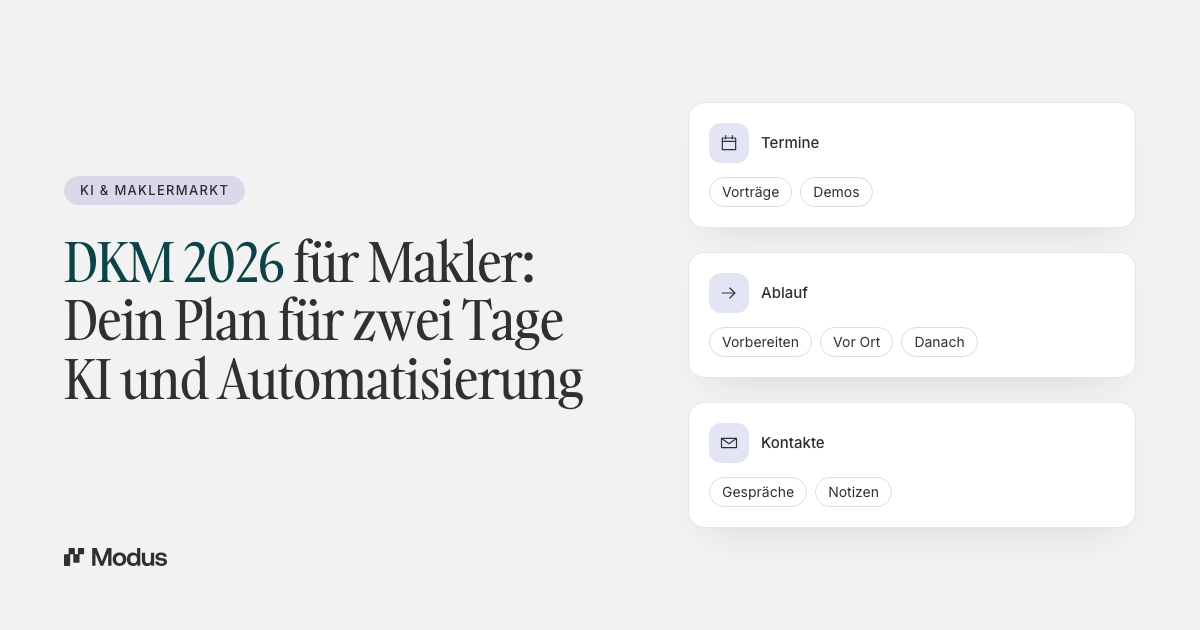
1. The document arrives, no matter the channel. A BiPRO delivery, email attachment, photo from a WhatsApp chat or scan all come together in one inbox. That's the prerequisite for everything else: as long as the same document can sit in three systems, there's no reliable single version.
2. The document type is recognised. Policy, endorsement, premium invoice, cancellation confirmation, claims correspondence. Classification by process type runs at 99.8 percent accuracy in live demos. What matters is less the number than what it makes possible: only once the type is settled can the system know which workflow belongs to it.
3. The client and policy are assigned. The document is allocated to the right client and the affected policy. Related cases are detected and linked, rather than running alongside each other as duplicates. An endorsement to a change that was started two weeks ago lands on that change, not in a new, empty case.
4. The relevant points are extracted and summarised. What has changed, from when it applies, which deadlines are attached. A summary is included, so no one has to read a twelve-page PDF from the top to grasp what it's about.
5. The broker reviews and decides. They see the document, the context and the summary in one place, make the technical assessment, correct where needed and sign off. If a reply to the client is required, it's ready as a draft. Nothing is sent without approval. Every step lands on a timeline, and the case stays traceable down to the detail, even years later.
The effect doesn't come from a single document. It builds up over the day, because dozens of small intermediate steps fall away. In our own brokerage, even in the early phase, one to two hours per employee per day are freed up this way that were previously tied up in sorting, assigning and searching.
Which document types have the biggest lever
Not every document is worth the same effort. The biggest effect comes from the types that occur often and follow a fixed pattern. In an average broker portfolio, these are above all:
- Policies and insurance certificates. The classic. They come after every new contract, belong unambiguously to one policy and have to be assigned cleanly before anything else happens with them.
- Endorsements and policy changes. More frequent than policies and harder to assign, because they attach to an existing policy and often to a case already running.
- Premium invoices and payment reminders. Deadline-bound, recurring, and they almost always pull client communication behind them.
- Cancellation confirmations. Formally tricky, because deadlines are attached to them and wrong filing gets expensive later.
- Claims correspondence. The hardest case, because it arrives spread across the most channels and drags on over weeks.
- Annual reports and standard enquiries. Large volumes, low individual value, high cumulative effort.
If you're looking for an entry point: take the type that occurs most often in your office, not the one that annoys you most. Frequency beats irritation, because it makes the effect visible faster.
Where the line runs: assigning is not assessing
At this point a clear statement is worth making, because the market likes to blur things here.
What software reliably does today: read documents, determine their type, assign them to the right client and policy, extract core data, update the right case, document everything.
What software does not take over: the technical assessment. Whether cover fits the client's risk, whether an exclusion in an endorsement is acceptable, whether a competitor's offer is the better one. These are advisory decisions with liability consequences, and they belong to the broker.
This division is not a technical limitation that will disappear at some point. It's the right division of labour. A system that claims to check policies in substance and conclusively promises something no one wants to take responsibility for when it counts. A system that takes over the groundwork and prepares the decision cleanly, on the other hand, changes day-to-day work measurably. Why this order matters especially in insurance, we described in "Why automation without structure is dangerous in insurance".
Before and after: an endorsement in daily practice
Two rows in this table stay unchanged, and that's by design. The technical assessment and the sign-off stay with the human. Everything before and everything after disappears from the working day.
This shifts the role: from doing the work yourself to reviewing and approving it. That's the real lever, because it moves scarce time from routine to judgment. What this means for the economics of a business, we work through in "What AI costs in the brokerage and when it pays off".
| Step | Traditional | With an operational AI layer |
|---|---|---|
| Receive the document | collected individually per channel | all channels in one inbox |
| Determine the type | open and read | classified automatically |
| Find the client and policy | search in the BMS | assigned automatically |
| Link to the ongoing case | manually, if at all | related cases identified and linked |
| Capture the content | read the entire PDF | summary provided alongside |
| Assess professionally | Broker | Broker |
| Reply to the client | draft from scratch | prepared draft, approved by the broker |
| Filing and documentation | track manually | automatically on the timeline |
What matters when choosing
Structure before automation. Automating unsorted document streams mostly just speeds up the disorder that's already there. The first step is always structure at the point of intake: every document gets a client, a policy, a case and an owner. Only then is automation worth it.
All channels, not just the convenient one. A solution that processes only BiPRO deliveries covers the share that already arrives structured anyway. The time sink is the unstructured rest: the photo, the scan, the attachment from an email with three forwarded layers. Check what happens to these documents.
Integration instead of switching systems. The management system stays the leading system of record. An operational layer sits over it and works with it, rather than replacing it. Modus is today connected to AMEISE and VEMA among others, works together with Outlook and brings more than twenty insurer connections with it. That way there's no duplicate data entry and no second place to search. For the architectures that exist for this and how they differ, see the overview "AI software for insurance brokers: what it does and what matters in 2026".
Traceability as a mandatory feature. With documents this isn't a nice-to-have but liability protection. Who received, assigned, checked and answered which document and when must be reconstructable years later. A documented timeline per case delivers that; a folder full of file names does not.
Data protection. Client documents belong only in a solution with a data-processing agreement and processing in the EU. A free consumer account does not meet that, even if it does technically good work at extraction.
The connection with the rest of portfolio servicing
Documents are rarely a topic in isolation. An endorsement belongs to a policy change, a premium invoice to a payment process, claims correspondence to a case in progress. That's exactly why isolated document filing brings little if the case around it is still run by hand.
The benefit emerges when both run together: the document updates the case that's being worked on anyway, and the case makes visible what needs doing next. For how the same approach works with servicing tasks like address changes and new bank details, see "Automating policy changes: how insurance brokers handle servicing tasks with AI".
How to approach the switch in practice
The mistake we see most often is trying to change everything at once. That creates resistance in the team and makes the effect invisible, because too many things change simultaneously. A realistic run over four weeks looks different.
Week 1: measure before you change anything. For one week, keep count of how many documents come in, through which channels, and which types dominate. Without that number you can't later say whether anything has improved. Experience shows that most offices misjudge their channel mix, usually in favour of BiPRO.
Week 2: switch over one document type. Take the most frequent type and run it fully through the new path, instead of five types halfway. Fully means: receive, assign, review, reply, close, all in one place. The point isn't the technology, it's the habit.
Week 3: bring the team in. As soon as more than one person works on the same case, the real benefit shows: ownership, status and history are visible without anyone having to ask. That's also the moment when queries within the team drop noticeably.
Week 4: expand and re-measure. Add further document types and hold them against the number from Week 1. If nothing has changed, it's almost never the software; it's that the old path is still being used in parallel. Media breaks are the most common reason automation doesn't hold in the brokerage.
Frequently asked questions
Can AI assign BiPRO documents automatically?
Yes. BiPRO deliveries already arrive structured and can be automatically allocated to the client, the policy and the right case. The bigger gain, though, lies with the documents that don't come via BiPRO: email attachments, scans and photos from the client chat. A solution should cover both paths, otherwise the real time sink remains.
Does the AI check policies in substance?
No. Capture, classification and assignment happen automatically, and the relevant data is extracted and summarised. The technical assessment of whether cover fits or an exclusion is bearable is made by the broker. This line is drawn deliberately, because advisory liability is attached here.
Where do the documents end up in the end?
In the leading system of record, that is, your management system, and additionally on the case they belong to. The case makes the connection visible; the management system stays the portfolio source. That way there's no second filing you also have to search later.
Does this replace my management system?
No. The operational layer sits over the management system and works with it. The management system stays responsible for portfolio and policies; the layer above structures the incoming work and carries it through to execution. A system switch isn't necessary.
How long does implementation take?
Because no system of record is replaced, it's not a migration project. A structured start over about four weeks is realistic, in which the team makes the new way of working a habit. The time gain shows with frequent document types within the first few weeks.
Conclusion
Document handling is the most inconspicuous part of broker work, and that's exactly why it's a good starting point. It's frequent, it follows clear patterns, and it ties up time that's missing in advice.
What can be automated is the path to the document: receive, recognise, assign, link, prepare, document. What stays with the broker is the assessment. It's precisely on this division that Modus is built, as an operational layer above the management system. It brings the channels together in one inbox, attaches every document to the case it belongs to, and holds every step on a traceable timeline. You still make the decision, just without the twenty minutes of groundwork before it.