How to choose the right software for your brokerage in 2026
Choosing software by the longest feature list optimises the wrong thing. How to pick the right software for your brokerage in 2026: five must-have criteria (integration, your own data as context, traceability, flexibility, less work), the real total cost, and a decision checklist.
By Daniel D.
Modus
Last updated: Jun 16, 2026
News & InsightsThe selection almost always starts the same way. You line up two or three demos, put the feature lists side by side and compare who has the most check marks. In the end, the system with the longest list wins. And six months later you realise the inbox is still full and cases take just as long as before.
That's rarely down to the software. It's down to the question the selection started with. Anyone who picks broker software by feature scope optimises the wrong thing. This guide shows which questions really count in 2026, how to recognise a good choice, and which costs you often overlook.
Why the feature list is the wrong starting point
A feature list tells you what a piece of software can do. It doesn't tell you whether it changes your day-to-day. That's exactly the difference that counts.
The real bottleneck in the brokerage isn't a lack of features but the missing connection between the systems. According to AssCompact, dovetailing the digital tools is the broker's daily dilemma: broker management system, comparison calculator, insurer extranets and email sit side by side, each with its own data format. The problem isn't the availability of technology, but the missing seamless integration.
A study on digitalisation in broker distribution confirms the picture. Only about one broker in three rates their own digitalisation as high, and at the very top of the wish list are unified interfaces and better data exchange. What's in demand, then, isn't more feature scope but fewer breaks between the systems.
A feature list masks exactly that. It counts individual parts instead of asking whether they add up to a flow. That's why a good selection doesn't start with the question "What can the system do?" but with the question "What does it change about my day?".
The new selection logic: operating model instead of feature scope
The better starting question is: does the software just store data, or does it move cases forward? Does it reduce real work or only typing? That sounds simple, but it flips the comparison around.
Interestingly, the market itself has long been judging by this standard. The annual industry tests of broker management systems rate systems not by the number of features, but by integration, enablement and added value. Three categories that aren't about what a system can do in theory, but what it actually delivers in operation.
One sobering figure fits this. According to a survey by procontra, a large majority of brokers use their management system mainly to retrieve documents and policies. So a powerful system is used predominantly as an archive. That shows how little sheer feature abundance says about real value. What matters, whether a system merely holds data or generates work, is also described in the article on why an AI feature is something different from an AI infrastructure.
Concretely for the selection, that means: two systems can have the same features on paper. One requires you to open, assign and file every email yourself. The other turns it into a case on its own. On the feature list, both look the same. In daily practice, worlds separate them.
This change of perspective has a pleasant side effect: it makes the comparison simpler, not more complicated. Instead of weighing thirty features against each other, you check a handful of questions that really decide the value. The selection conversation becomes shorter and more honest, because a real case immediately shows whether a system delivers what the list promises.
The five must-have criteria for 2026
Instead of a long feature list, five criteria are enough to seriously assess software.
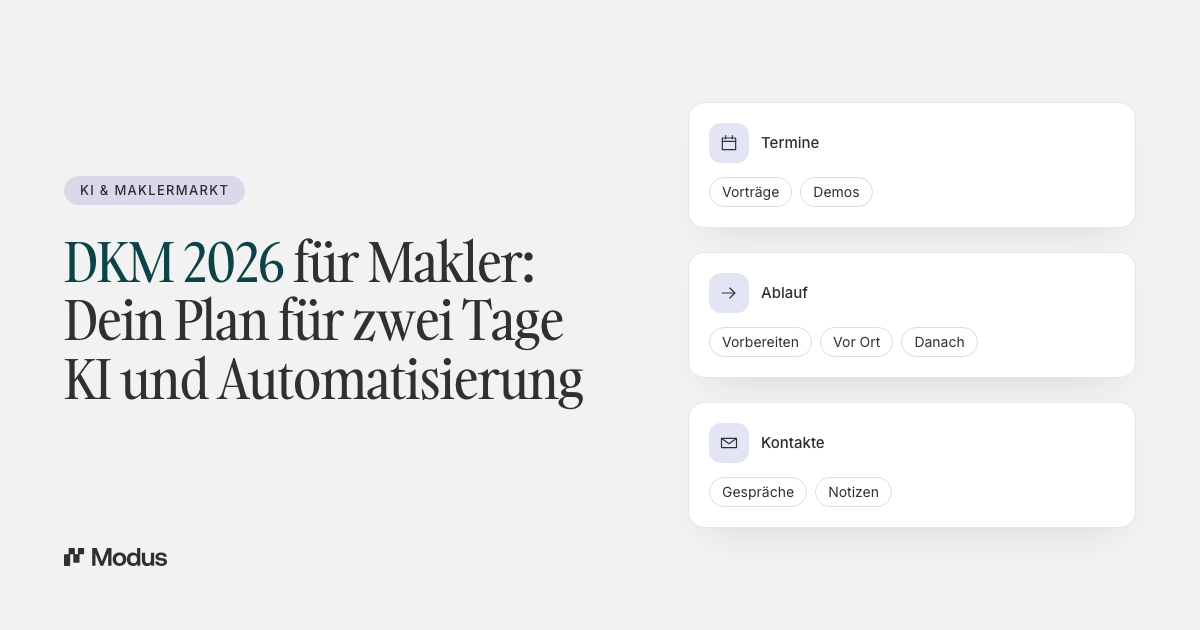
1. Integration instead of an island. Does the system connect with your broker management system, with Outlook and via BiPRO with the insurers? Or does it add yet another login and yet another data silo? The Brancheninitiative Prozessoptimierung (BiPRO) set the standards for this. Via the BiPRO 430 standard, for example, insurer documents flow directly into the system instead of being pulled individually out of each extranet. The better the interfaces, the less manual transfer.
2. Your own data as context. Does the software use your portfolio, your history and your open cases, or does it work in a vacuum? An AI that doesn't know the context can only give generic answers. Value emerges only when the system works on your actual data. Ask specifically where the system draws its information from and whether, for a client enquiry, it automatically places the relevant policies and the history alongside.
3. Traceability. Does an auditable trail remain of who decided what and when? That's not only a question of order but also of compliance. Especially when using AI, the regulator requires decisions to remain traceable. Why structure and traceability have to come before automation is explored in more depth in the article on why automation without structure is dangerous in insurance.
4. Flexibility and openness. Do you remain the owner of your data and processes, or do you tie yourself more deeply to a provider or a pool with every month? Many systems create a creeping lock-in. Through data formats that can barely be migrated. Through pool contracts coupled to the software. Through interfaces that only work in one direction. Anyone choosing today should know in advance what the way back out looks like. Check whether you can export your data at any time in an open format, whether the software remains usable even without a pool tie-in, and whether it can connect with alternative systems. Flexibility isn't a comfort topic but the precondition for your business still owning its own work in five years.
5. Does it reduce work or only typing? The sharpest criterion. A good system doesn't save a few minutes of typing, it takes whole cases off your hands. In the demo appointment, don't ask "What can it do?", but "Show me a complete case from incoming email to finished reply."
These five questions separate software that strengthens your foundation from software that only grows the pile.
What software really costs
The licence price is the most visible but rarely the biggest cost block. Many broker management systems run at 50 to 100 euros per month per workstation, some are co-financed through pools or networks. This is exactly where a trap lies: "free" via the pool often means dependency, not savings.
The real costs lie elsewhere. According to Gartner, organisations regularly underestimate the total cost of software, above all because of unexpected integration and configuration effort. The running costs can amount to a multiple of the purchase price. Translated into the brokerage, that means: licence, setup, training and above all the time that still flows into manual work despite the software add up to the true bill.
A simple calculation makes it clear. Suppose a piece of software costs 80 euros per workstation per month. Add setup, interfaces and training, and the first year's outlay quickly reaches a multiple of the licence alone. Against that stands the time the system saves. If it takes an hour of admin off each employee every day, that value is greater in any brokerage than the price difference between two providers.
That's why it's worth switching the metric. Don't calculate in euros per month, but in hours per case and in revenue per employee. Software that costs ten euros more but frees up an hour a day per employee is many times cheaper. Why revenue per employee is the decisive metric for brokerages hangs directly on this.
The team decides too
The best software fails at rollout if the team doesn't come along. That's especially true when you're switching an existing system. Data migration is considered the biggest hurdle, and during the transition two systems often run in parallel. Industry surveys regularly name usability as the most important selection criterion, ahead of feature scope. That's no coincidence: a system nobody likes using never unfolds its value.
Three things make the rollout easier. First: involve the employees who work with it daily early on. They notice immediately whether a system eases their day or only brings new clicks. Second: name two internal points of contact who really know the system, instead of relying on one. Third: start with the most frequent case type, validate it and then roll out, instead of switching everything at once. Anyone who takes these three points to heart shortens the rollout from months to weeks and avoids the most common mistake: a good system that in the end nobody uses.
That's exactly why a layer that sits on top of the existing system is often the lower-risk path than a complete replacement. The difference between replacing and complementing, and why the two aren't the same, is set out in the comparison of broker management system and operating system. What such a layer even is, is explained in the article What an operating system for insurance brokers actually is.
Does the software fit the size of your office?
Not every solution fits every office. A solo broker needs something different from an office with fifteen employees. For small offices, what matters most is that the software runs without a long learning curve and orders the inbox right away. Every hour saved weighs especially heavily here, because there's no reserve to step in.
Larger offices additionally watch for modularity and clear roles. When several people work on the same case, ownership, priority and traceability become a precondition, not an extra. In both cases, it's important that the software grows with the office, instead of becoming too tight again after the next growth step.
The decision checklist
For the next selection conversation, everything can be condensed into a few yes-no questions:
- Does the system connect my broker management system, Outlook and the insurers via BiPRO?
- Does it use my own portfolio data as context?
- Does it turn incoming communication into structured cases with ownership and priority?
- Does a traceable trail remain for every case?
- Does it reduce whole cases or only individual steps?
- What does the integration cost on top of the licence?
- How involved is the data migration?
- Does it tie me to a pool or do I stay free?
- Does the scope fit the size of my office, lean for small ones, modular for larger ones?
- Can I see a complete case from start to finish in the demo appointment?
If the majority of these questions are answered yes, the software is more than a collection of features. It's a foundation on which your business runs more easily.
Frequently asked questions
Which software do insurance brokers need?
At their core, insurance brokers need a broker management system as a data foundation and an operational layer that turns this foundation into work. The management system stores clients, policies and documents. The operational layer takes in incoming communication and turns it into structured cases. On top of that, depending on the line of business, come comparison calculators and interfaces to the insurers.
What should you look for when choosing broker software?
Five things: integration into existing systems, use of your own data as context, traceability of cases, flexibility and openness without lock-in, and the question of whether the software reduces real work or only typing. The number of features is secondary. What matters is whether individual steps turn into an end-to-end flow.
What does broker software cost?
Many broker management systems run at 50 to 100 euros per month per workstation, some are co-financed through pools. But the licence price is only one part. Integration, training and the time that flows into manual work despite the software often make the total cost significantly higher. So calculate in total cost and in saved working time, not just in the monthly price.
Is there free broker software, and what's the catch?
There are broker management systems provided free of charge through pools or networks. The catch is the tie-in: anyone sourcing the software through a pool is coupled to its connection and terms. That can be a fit, but it should be a conscious decision and not made on price alone.
Which software suits small brokerages?
Small offices benefit from lean, well-integrated systems that work without a long learning curve. More important than a large feature scope is that the software orders the inbox and reduces manual transfer. Especially with few employees, every hour saved counts particularly.
How important is BiPRO in the selection?
Very important. BiPRO standards like BiPRO 430 ensure that documents and data from the insurers reach the system in a structured way, instead of being fetched individually out of each extranet. The better a piece of software supports BiPRO, the less manual work arises at the interface to the insurers. BiPRO capability therefore belongs on every shortlist.
Should I switch my broker management system or complement it?
That depends on whether your portfolio system reliably holds the data. If it does, a complementary layer on top is usually the lower-risk path than a complete switch, because the involved data migration is avoided. A switch is worthwhile above all when the management system itself is outdated or key interfaces are missing.
How do I tell in the demo appointment whether a piece of software really takes work off my hands?
Don't let them show you a feature tour, but a complete case. Ask them to run through an incoming email all the way to the finished, approved reply. Watch how many steps still happen by hand. The fewer manual interventions needed, the more likely the system takes real work off your hands and not just typing.
Conclusion
You'll recognise the right software for 2026 not by the longest feature list, but by the simplest question: does it change your day? A good choice connects your systems, uses your data, stays traceable, keeps you independent and takes whole cases off your hands. This one question, whether the software changes your day, spares you most of the expensive wrong decisions.
Anyone who chooses this way buys not another tool, but a foundation. And it's precisely on that foundation that the lever emerges which lets a brokerage grow without the team growing to the same degree.
Scale revenue. Not headcount.
Don't miss any developments in AI for insurance brokers. Sign up for updates now.